
Thursday, January 12, 2017
Questions about the new subscription plans
We're excited to announce that our new RentLinx subscription plans have launched today. We've been getting a ton of questions about the new service, so I wanted to address some of those here:
Q: How much does the service cost?
A: Our pricing is posted here: https://www.rentlinx.com/subscription-pricing
Q: Is the price per property or per management company?
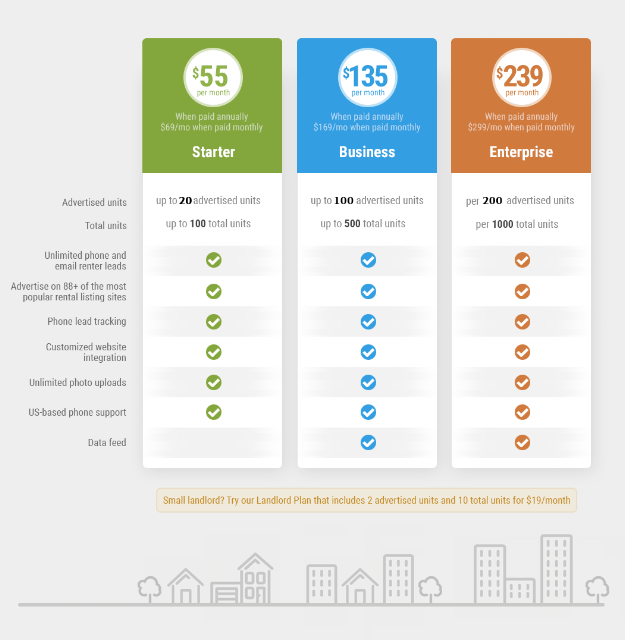
It's per management company, but there is a cost breakdown available per property (see below). To figure out the cost for your company, take your total number of units under management and find the tier that covers you for "total units". The "Advertised units" number means you can have that many actively advertised/available/posted at a time.
For example, if your management company manages 400 units across ten different properties, then the "Business" plan would work great as it allows up to 500 units. On the business plan you can have up to 100 units advertised at a time.
Q: Is there a per-property price breakdown if my company signs up?
A: Yes. We do offer a price breakdown by property so you can easily allocate your one company invoice into a property specific expense.
Q: Do I have to commit to a full year?
No. There are no contracts or commitments, so you can change plans or deactivate your plan at no additional cost at any time. For example, if you have no availabilities during the winter, you could deactivate your plan and have no cost for those months. When you reactivate your subscription, all of your property data will be ready to go.
Q: Can I pay monthly instead of annually?
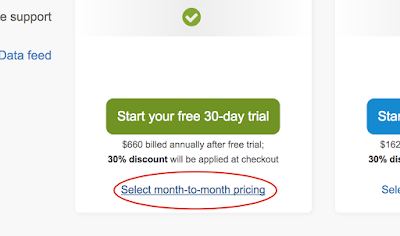
A: Yes. Make sure to look below the annual button for the "month to month" pricing link:
Q: What if I pay for a year in advance then cancel my subscription?
A: Whenever you cancel your subscription your account will stay active through the end of the term. For example if you cancel in the middle of your billing month, you'll be able to use your account through the end of the month. When you cancel an annual plan, you'll be able to use your account through the end of the year, and won't be billed after. If you plan on starting and stopping your plan just when you have vacancies, we recommend sticking to the monthly plan.
Q: I only have a couple units, do you have a cheaper plan?
A: Yes, make sure to look way at the bottom of our pricing page for the "Landlord" plan that is good for up to ten units (four advertised) at a time. You can also start and stop it so you're just paying when you have a vacancy.

Q: I have more than 1,000 units, can I use RentLinx?
A: Absolutely. Please contact us for volume pricing and we will be in touch shortly!
Q: How much does the service cost?
A: Our pricing is posted here: https://www.rentlinx.com/subscription-pricing
Q: Is the price per property or per management company?
It's per management company, but there is a cost breakdown available per property (see below). To figure out the cost for your company, take your total number of units under management and find the tier that covers you for "total units". The "Advertised units" number means you can have that many actively advertised/available/posted at a time.
For example, if your management company manages 400 units across ten different properties, then the "Business" plan would work great as it allows up to 500 units. On the business plan you can have up to 100 units advertised at a time.
Q: Is there a per-property price breakdown if my company signs up?
A: Yes. We do offer a price breakdown by property so you can easily allocate your one company invoice into a property specific expense.
Q: Do I have to commit to a full year?
No. There are no contracts or commitments, so you can change plans or deactivate your plan at no additional cost at any time. For example, if you have no availabilities during the winter, you could deactivate your plan and have no cost for those months. When you reactivate your subscription, all of your property data will be ready to go.
Q: Can I pay monthly instead of annually?
A: Yes. Make sure to look below the annual button for the "month to month" pricing link:

Q: What if I pay for a year in advance then cancel my subscription?
A: Whenever you cancel your subscription your account will stay active through the end of the term. For example if you cancel in the middle of your billing month, you'll be able to use your account through the end of the month. When you cancel an annual plan, you'll be able to use your account through the end of the year, and won't be billed after. If you plan on starting and stopping your plan just when you have vacancies, we recommend sticking to the monthly plan.
Q: I only have a couple units, do you have a cheaper plan?
A: Yes, make sure to look way at the bottom of our pricing page for the "Landlord" plan that is good for up to ten units (four advertised) at a time. You can also start and stop it so you're just paying when you have a vacancy.

Q: I have more than 1,000 units, can I use RentLinx?
A: Absolutely. Please contact us for volume pricing and we will be in touch shortly!

Thursday, October 27, 2016
New RentLinx Subscription Plans
We are excited to announce an upcoming change to the RentLinx service. In effort to provide the best possible service, beginning in January we will no longer be providing a free advertising option and instead asking all of our users to move to a paid subscription plan. We’ve enjoyed being able to offer this service for free for the last 10 years but in order to continue to be a leader in the marketplace and fund future development we're making this change to provide even more exceptional value to our customers.
If you are a current paying RentLinx customer who has subscribed to Brokers and Locators, WebLinx, or DataLinx services or are an active user of Plus! this change will not affect you. You should have received an email letting you know that you will be able to stay on your current plan or your subscription will be comped at no additional cost.
Our new subscription model offers affordable tiers based on your company size as shown below.
The new service will include the same great advertising syndication as before, along with some additional valuable services:
Thank you for your support.
-Jeremy Schneider
If you are a current paying RentLinx customer who has subscribed to Brokers and Locators, WebLinx, or DataLinx services or are an active user of Plus! this change will not affect you. You should have received an email letting you know that you will be able to stay on your current plan or your subscription will be comped at no additional cost.
Our new subscription model offers affordable tiers based on your company size as shown below.

The new service will include the same great advertising syndication as before, along with some additional valuable services:
- Advertising on 88+ national and local apartment search websites
- Phone tracking with recorded calls
- Custom website integration for your listings
- Automated property upload via data feed
- US based phone and email support
- Optional Plus! per property upgrades for $10 a lead
Thank you for your support.
-Jeremy Schneider
FAQ - (Updated 11/08/2016)
Q: Do you have a more affordable plan for landlords and property managers with just a few units?
A:We do! The landlord plan is $19/month and is good for up to two advertised units at a time. You can see it in the pricing graphic above hidden at the bottom in the yellow box. We'll make it more clear when it's time to sign up next year. Also, all plans can be stopped and started at any time with no contracts or commitments beyond the term you paid for. So if you just have a couple availabilities per year, you can leave your account dormant (we'll keep your data safe) and reactivate it when you need it!
Q: Can I keep my current pricing? What if I want to switch to a different level?
A: Starting January, we'll have a single pricing structure that will cover all of our services for all types of companies. Current paying customers can stick with their current plan, but after January you'll only be able to switch to one of the new plans. If you want to choose a different existing plan, do so prior to January 1st.
Q: Do you have a more affordable plan for landlords and property managers with just a few units?
A:We do! The landlord plan is $19/month and is good for up to two advertised units at a time. You can see it in the pricing graphic above hidden at the bottom in the yellow box. We'll make it more clear when it's time to sign up next year. Also, all plans can be stopped and started at any time with no contracts or commitments beyond the term you paid for. So if you just have a couple availabilities per year, you can leave your account dormant (we'll keep your data safe) and reactivate it when you need it!
Q: Can I keep my current pricing? What if I want to switch to a different level?
A: Starting January, we'll have a single pricing structure that will cover all of our services for all types of companies. Current paying customers can stick with their current plan, but after January you'll only be able to switch to one of the new plans. If you want to choose a different existing plan, do so prior to January 1st.
Wednesday, August 26, 2015
Answers to Your 7 Most Common Questions

- How often should I be updating my listing?
We recommend logging in and clicking the "Mark as updated" link a couple times per week. Fresh ads get more visibility than older ones! - How do I add a new unit to my existing property listing?
From your Manage Properties page (the first one you see after logging in), click on your property address/community name. Just underneath the rent amount listed in your existing unit, you'll see a link that says "Add a New Unit". Click that to tack on another unit to your listing! - How do I remove a property once it's leased?
First, do a happy dance, because you've found a renter and that's awesome! Next, log into your account and click that green Active button. From the dropdown menu that appears, select "Mark as leased". This will stop the advertisement of your listing and save the information in your account in case you need to re-list the property with us in the future. - Someone inquired about my property via email. How do I reply to them?
The email you receive from us will contain contact information that the prospective renter provided. You can call them if they left a phone number, or if you want to email them, just hit the reply button like you're responding to any other email. You can also click on their email address, and most email clients will open up a new message that's ready to be composed and sent to the renter. - When it comes to Plus!, what's the difference between Plus! for Small Properties and Plus! for Communities?
Plus! for Small Properties and Plus! for Communities differ only in pricing structure. Small Properties is ideal for properties that have 20 or fewer units, and is a flat fee of $50 for 30 days of Plus! advertising. Communities is for properties with 21 or more units, and these upgrades pay $10 per verified lead with a minimum of 5 leads. You can set your monthly maximum to whatever best fits your budget. - Speaking of Plus!, what's up with that crazy phone number and extensions I see on my listings?
This is your property's special tracking phone number. It allows us to log and record each incoming call from prospective renters. Don't worry -- it will still ring to the phone line you've provided in your account settings! The extensions refer to the specific partner site the caller found your ad on. If there is no extension, the caller is prompted to dial 0 to be connected. - You guys are the absolute best. Is there any way I can give you more money?
Great question! We get this all the time. The answer is YES, you can give us more money! Non-sequential 10s and 20s work best.
In all seriousness, do check out our full suite of products (including Plus! and WebLinx) to see if they're a fit for you.
We hope you've found this Q&A useful! If you have a question that wasn't answered here, be sure to check our help docs! As always, you can drop us a line at support@rentlinx.com or phone us at 800-510-5469 (Monday thru Friday, 10:00 a.m. - 5:00 p.m. Pacific). We'll look forward to speaking to you!


Friday, July 24, 2015
Get to Know: Tony Wright, Software Engineer
 What is your position with RentLinx?
I'm a Software Engineer working on the core RentLinx product suite.
How did you end up working for RentLinx?
Before finding RentLinx, I had spent some time at a large company, a small non-profit organization, and also did some freelance work. But it was a little office in Pacific Beach that won my heart. Haven't looked back since!
What does your job entail?
I build out a lot of new features on rentlinx.com and showmetherent.com. I also fix the occasional bug and put tests in place in order to ensure the same thing doesn't break twice!
What is the most difficult part of your job?
They say that "legacy code" is code you wrote 6 months ago. One of the difficult parts of my job is continuously modernizing our code base so that nothing feels too old or stale.
What's the best part of your job?
I should probably say something altruistic - I mean, it's good to help renters find apartments, and it's good to help property managers find tenants. But if I'm being honest, the best part of my job is the people here at RentLinx. There are good folk around these parts. Except for Forrest. He's miserable. (Just kidding, Forrest!)
Where are you originally from, and how did you end up in San Diego?
I have the Midwest in my veins but have lived in San Diego since I was a kid. I hope I never leave!
What do you like to do in your spare time?
Sleep. It's not a basic human necessity; it's an art form.
Do you have any unusual hobbies?
I play Ultimate Frisbee at night with a light-up disc every week. I also spend a lot of time reading 4th century authors and pondering ethics.
Tell me about your family, pets, etc.?
I've been happily married for about two years now. We just purchased our first home - a duplex shared with my brother and sister-in-law. No pets; if I have to put that much time and effort into caring for another living thing, I expect it to at least have the decency to put me into a retirement home when I'm old and grey.
Do you have a favorite saying or quote? If so, what is it and why is it your favorite?
“It is all very well for you to write simply and the simpler the better. But do not start to think so damned simply. Know how complicated it is and then state it simply.” - Ernest Hemmingway
It's a challenging mantra. It doesn't come easily. But it is absolutely essential for effective communication.
Wednesday, May 20, 2015
Even More New Features!
We've got some great new features for you! Grab some tea, get cozy, and prepare to be wowed!
1) The Manage Properties Facelift
 |
| Gorgeous, right? We think so, too! |
We've redesigned the Manage Properties Page and added some really cool functions.
- There's now a Property Search Bar on the top right side that lets you filter your properties by keyword, property name, and/or address. If you have pages and pages of properties, you'll now be able to find exactly the one you're looking for with just a quick search!
- Those Facebook and Twitter Icons are much cooler. And speaking of icons, there's a few new ones you may see next to your properties -- like the one that denotes a hidden address.
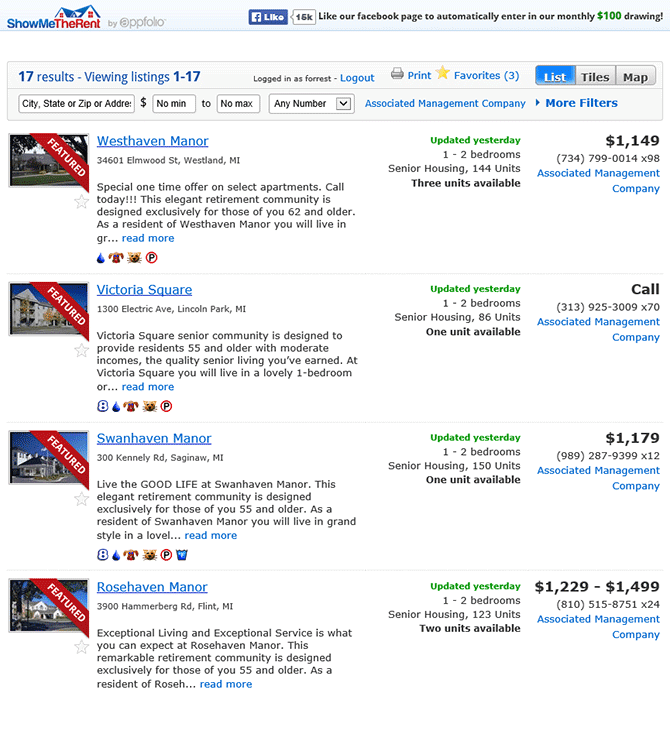
- We've added a ShowMeTheRent Share Link at the bottom right. This takes you to a list of all of your properties on ShowMeTheRent.com, which is great to pass along to your potential renters. Here's an example list:
2) Pay Invoices with a Credit Card
You can now pay any invoices that are due with a credit card! If you already have a card on file, you'll see a link in your billing information to use this feature. You can add a new credit card if you don't already have one on file. Check out our help article for more detailed step-by-step instructions on how to use this feature.
3) XML Feed for Your Company
If you'd like to download an XML file with all of the data from your RentLinx listings, you're in luck! You can contact us to enable this feature, and once that's done, you'll be able to access and download your company feed.
As always, thanks for using RentLinx, and let us know about more features you'd like to see in the future!


Wednesday, April 08, 2015
Big News! RentLinx Acquired by AppFolio!

Hi Everyone,
I started RentLinx almost exactly 10 years ago in the April of 2005 and I’m writing to share some exciting news with you. I’m beyond proud and excited to announce that we have been acquired by AppFolio as of April 1st, 2015! Below I have answered a few questions you might have.
Is RentLinx going away?
No! We will still operate as an independent service and continue to grow and improve. We will also be integrating some of our powerful advertising tools into AppFolio.
What does this mean for me?
Only good things. We’ll be hiring more developers, adding new features and generally improving everything to make your advertising experience even better.
What is AppFolio?
AppFolio Property Manager is the fastest growing and most advanced property management software in the industry. Thousands of property management companies across the US use AppFolio to help run nearly every aspect of their businesses. I’ve spent the last few months learning about the product and the company and I couldn’t be more excited to team up with them.
What else does AppFolio do?
So much cool stuff! One of the reasons I’m most excited about this acquisition is that we get to introduce AppFolio’s full suite of services to RentLinx customers. We constantly get requests for services that we simply haven’t been able to provide in order to maintain our focus on advertising, but AppFolio does it all! Specifically AppFolio offers:
- Online rental applications & leases
- Built-In resident screening
- Online rent collection
- Mobile inspections
- Complete accounting
- Customizable reports
- Property Management Websites
- And tons more!
If you’re curious if AppFolio could work for your business, please send a quick reply to this email and I would be happy to put you in touch with an AppFolio representative who can give you more information about the software. You can also check them out yourself at www.appfolio.com
What if I already use AppFolio Property Manager?
That’s awesome! Stay tuned for updates to both AppFolio and RentLinx. Soon you won’t have to maintain separate accounts as your listings will begin flowing automatically. For now, just keep doing what you’re doing and look forward to continued improvements.
I’d like to sincerely thank you for finding and using RentLinx and helping us grow to where we are today. I can’t wait for the next 10 years which promise to be even more exciting!
Jeremy Schneider
Founder & President, RentLinx
www.rentlinx.com


Tuesday, March 24, 2015
New RentLinx Features!

Our software developers have been busy making RentLinx better for you. Some of our recently launched new features are:
Basic:
- When you update your email address, we update your RentLinx ID to match.
- It is now easier to list a room for rent.
- Your Plus! listings are now on Apartments.com!
- Any user with access to a property listing can request lead refunds for that property.
- A phone call from someone who hangs up without indicating the source of the lead is automatically considered a free lead.
- We launched a new service for brokers, locators, Realtors and agents. If you help renters find apartments, and you're not the property manager or owner, then our new service is for you! Learn more here.

.png)
Monday, March 16, 2015
New ShowMeTheRent Designs!
Check out the beautiful new designs at ShowMeTheRent!
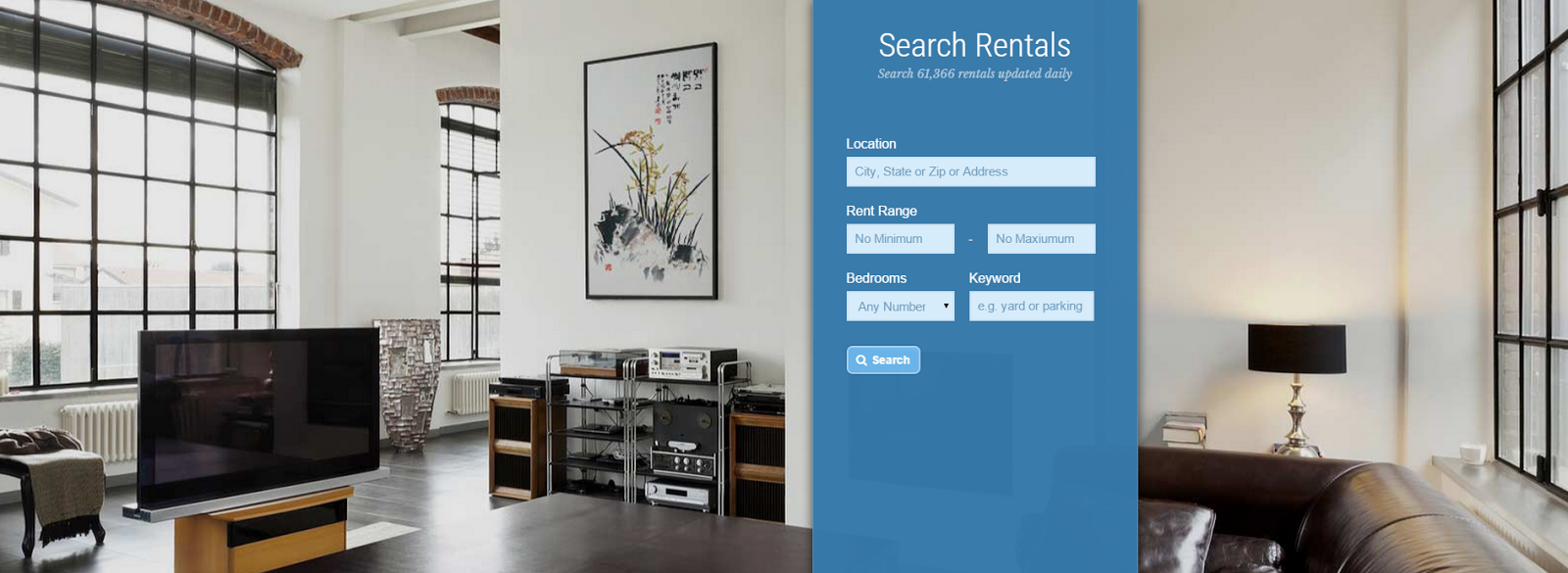

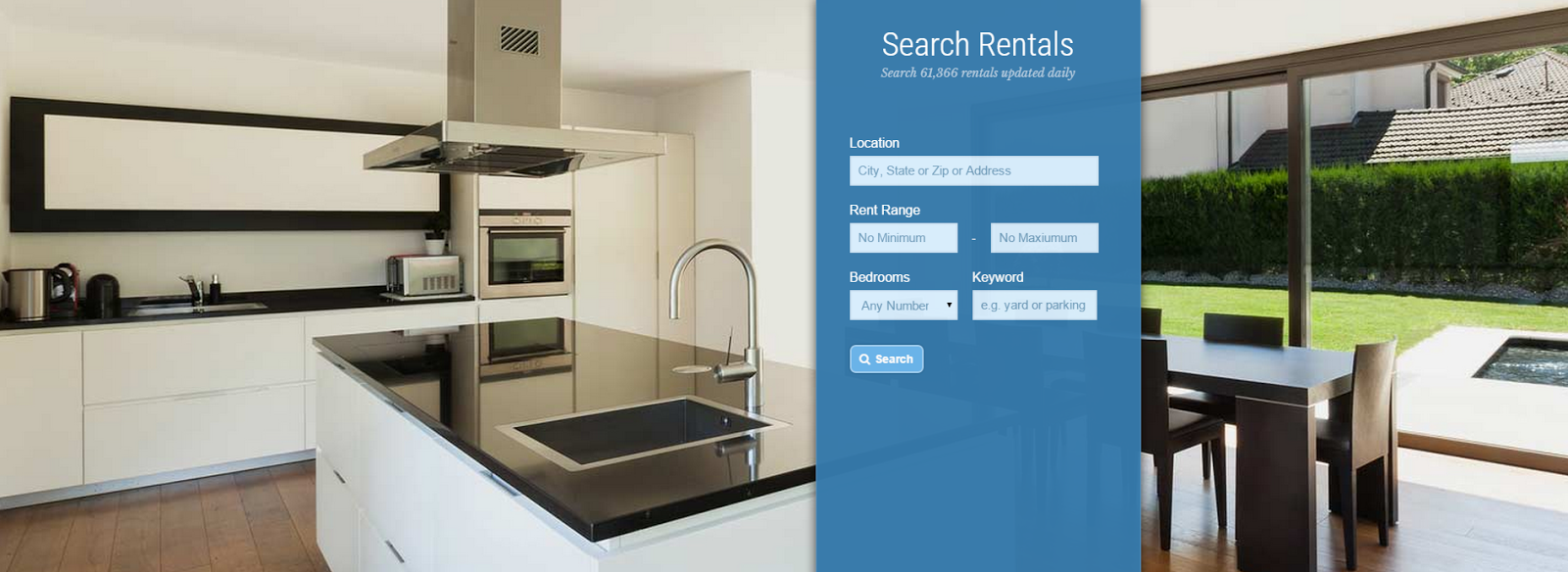
ShowMeTheRent is a great place to begin an apartment search. We post tons of fresh listings every day, it's an easy-to-use site, and there are lots of unique search features available -- keyword, school districts, and map boundaries, to name a few! ShowMeTheRent has 2 million page views per month, marking its web traffic at an 8 percent increase from a year ago.
Fun fact: The busiest day of the week for ShowMeTheRent traffic? Monday! Surprisingly, Saturday is actually the slowest day for searches.
Has your listing been found and/or leased via a lead from ShowMeTheRent? Tell us in the comments!

ShowMeTheRent is a great place to begin an apartment search. We post tons of fresh listings every day, it's an easy-to-use site, and there are lots of unique search features available -- keyword, school districts, and map boundaries, to name a few! ShowMeTheRent has 2 million page views per month, marking its web traffic at an 8 percent increase from a year ago.
Fun fact: The busiest day of the week for ShowMeTheRent traffic? Monday! Surprisingly, Saturday is actually the slowest day for searches.
Has your listing been found and/or leased via a lead from ShowMeTheRent? Tell us in the comments!
Previous Posts
- Questions about the new subscription plans
- New RentLinx Subscription Plans
- Answers to Your 7 Most Common Questions
- Get to Know: Tony Wright, Software Engineer
- Even More New Features!
- Big News! RentLinx Acquired by AppFolio!
- New RentLinx Features!
- New ShowMeTheRent Designs!
- Add a Logo to Your Renter Portal & Brochures!
- The Linx Between Renting and Dating
Archives
- January 2006
- February 2006
- March 2006
- April 2006
- May 2006
- June 2006
- July 2006
- August 2006
- September 2006
- October 2006
- November 2006
- December 2006
- January 2007
- February 2007
- March 2007
- April 2007
- May 2007
- June 2007
- July 2007
- August 2007
- September 2007
- October 2007
- November 2007
- January 2008
- February 2008
- March 2008
- April 2008
- June 2008
- July 2008
- September 2008
- November 2008
- January 2009
- March 2009
- April 2009
- June 2009
- July 2009
- August 2009
- October 2009
- November 2009
- December 2009
- January 2010
- February 2010
- March 2010
- April 2010
- May 2010
- June 2010
- July 2010
- August 2010
- September 2010
- October 2010
- January 2011
- February 2011
- March 2011
- April 2011
- May 2011
- June 2011
- July 2011
- August 2011
- September 2011
- October 2011
- November 2011
- December 2011
- January 2012
- February 2012
- March 2012
- April 2012
- May 2012
- June 2012
- July 2012
- August 2012
- September 2012
- October 2012
- November 2012
- December 2012
- January 2013
- February 2013
- March 2013
- April 2013
- May 2013
- June 2013
- July 2013
- August 2013
- October 2013
- November 2013
- December 2013
- January 2014
- February 2014
- March 2014
- April 2014
- May 2014
- June 2014
- July 2014
- August 2014
- September 2014
- October 2014
- November 2014
- December 2014
- January 2015
- February 2015
- March 2015
- April 2015
- May 2015
- July 2015
- August 2015
- October 2016
- January 2017
